
ZenBusiness: LLC Formation
ZenBusinessBusiness
3.6214.00 Reviews
- Version
- 2026.14
- Installs
- 100.00K
- Age Rating
- Everyone
Screenshots



Our Review of ZenBusiness: LLC Formation
 Analysis by Appyee
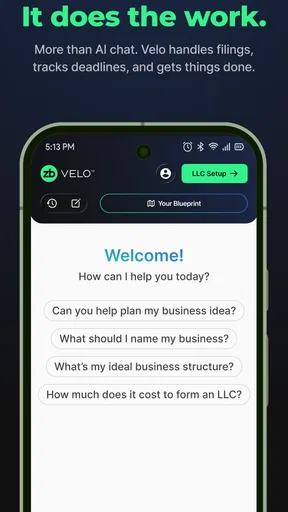
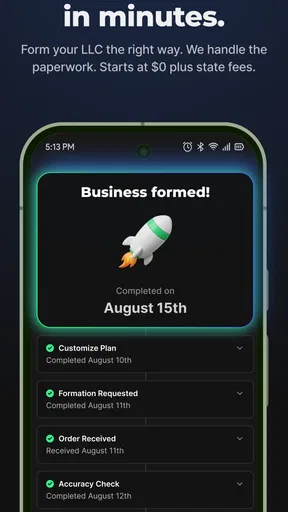
Starting a business is exciting until the paperwork turns a simple idea into a long checklist. I tried ZenBusiness: LLC Formation with that in mind, and my overall impression is that it is most useful as a guided starting point rather than a complete replacement for careful business research. The app comes from ZenBusiness, sits in the business category, and is free to install. Its main purpose is helping people form an LLC while offering personalized Velo® AI guidance during the early stages of building a company.
That focus makes it different from a general budgeting app, an invoicing tool, or a broad business-planning platform. It is aimed at the moment when you are deciding how to organize a business and need help moving through the formation process. I found that useful because the hardest part is often not typing information into a form; it is knowing what to prepare, what each question means, and where to pause before submitting something important.
The app carries an Everyone content rating, so its presentation is intended for a broad audience. It was released on April 20, 2022, and the current version is 2026.14, with Android 11 or later required. It has passed one hundred thousand installs and holds a 3.6 average from 894 ratings, alongside 214 written reviews. Those figures suggest a real user base, but also a mixed experience, which matches my view: the concept is approachable, while the consequences of a mistake in business formation mean the app still requires attention from the person using it.
Where the formation process can become confusing
The first friction point is expectation. Someone opening this app may hope to answer a few questions and immediately become ready to trade. In practice, forming an LLC is a decision-making process, not just a digital form. You need to think about the business name, the people involved, the address and contact details, the nature of the business, and the state-specific requirements that may apply. The app can make that path feel more organized, but it cannot make those decisions on your behalf.
I recommend opening it when you have already written down the basic facts of your business. Keep the proposed name, owner information, business address, mailing details, and a short description of what the company does in one place. This small preparation step matters because switching between the app, email, notes, and official documents is where errors creep in. A guided interface is helpful only when the information going into it is consistent.
Another common sticking point is the difference between forming an LLC and running one. ZenBusiness: LLC Formation is centered on the formation stage and early guidance. That does not mean the app should be treated as your full accounting system, legal reference library, tax adviser, or customer-management platform. If you need detailed bookkeeping, payroll, inventory, or sales tracking, a dedicated tool will be a better fit. I would use this app to get oriented and move through formation-related tasks, then add specialized services when the business actually needs them.
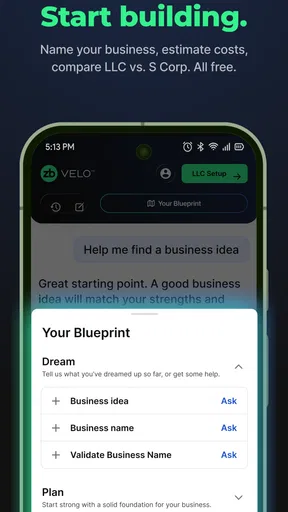
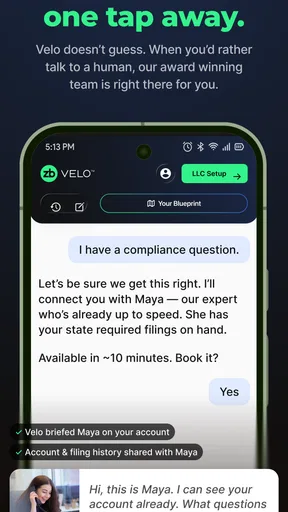
The Velo® AI guidance is an interesting part of the experience because it gives the app a more conversational feel than a static checklist. I found that kind of help most valuable for translating a confusing business question into plain language or suggesting what to consider next. I would not treat an AI response as the final word on a legal or tax decision, though. The right use is to ask for clarification, identify questions to research, and then verify important choices with an authoritative source or qualified professional.
That distinction is especially important for a first-time founder. A confident-sounding answer can still be too general for a particular state, industry, ownership structure, or tax situation. The practical advantage of the assistant is speed and orientation. The practical limitation is that guidance is not the same thing as professional advice. Keeping that boundary in mind prevents the app from creating false confidence.
What to prepare before tapping through the screens
Before starting, I would make a short preparation sheet with the exact spelling of the proposed company name, the responsible person’s legal details, and the address that should be used consistently. If more than one person is involved, agree on the ownership information before opening the workflow. This is one of the less obvious ways to save time: the app can guide the process, but it cannot resolve disagreements between future owners.
I would also decide whether you are merely exploring the idea or genuinely ready to form the company. If you are still comparing names, testing demand, or choosing between a sole proprietorship and an LLC, beginning a formal workflow may be premature. The app is more useful once the business concept has reached a point where organizational decisions are worth recording.
Read each prompt instead of treating the process like a quiz. A question that looks routine may affect how information is recorded later. When the wording is unclear, use Velo® AI to ask what the question is trying to establish, then confirm the answer independently if it affects ownership, taxes, compliance, or legal responsibility. This two-step habit is safer than accepting the first explanation automatically.
Checks that prevent avoidable setup trouble
My most useful setup check is consistency. Compare every important detail against the source document or note where you keep it. Names should use the same spelling, addresses should not be copied from memory, and contact information should be current. If you are preparing the application on behalf of a small team, have another owner review the details before anything is finalized.
It is also worth checking the device and operating system before blaming the app for a technical problem. The Android requirement is version 11 or later, so an older phone may be the reason the app cannot be installed or behaves unexpectedly. On a compatible device, update the app through the normal store process, close unnecessary background apps, and restart before repeating a stalled action. These are simple steps, but they separate a device issue from a workflow issue.
Keep a record of where you stopped. I would note the last completed screen, the information entered there, and whether the app displayed a confirmation. This is more useful than repeatedly pressing the same button because it gives you a clear recovery point. It also prevents accidental duplicate attempts when you are unsure whether a request went through.
Privacy deserves practical attention as well. Business formation involves sensitive personal and company information, so I would avoid completing the process on a public device or an unsecured network. Use a phone you control, keep the operating system updated, and review each screen before confirming. These precautions are not a criticism of this particular app; they are sensible habits whenever identity and business details are involved.
Recovering when a workflow stops halfway
When a screen appears stuck, the first thing I do is avoid assuming that the information has been lost. I check whether the page has finished loading, confirm that the connection is stable, and wait briefly before closing anything. If the app still does not respond, I reopen it and look for the last saved point rather than starting over immediately. Repeating a submission without checking its status can create more confusion than the original problem.
If the app returns to an earlier screen, compare the visible information with your preparation sheet. Do not fill gaps from memory when the details involve legal names, addresses, or ownership. Re-enter only what is missing, and make a note of what happened. That note becomes valuable if you need help from the developer’s support channel because you can describe the exact stage instead of saying only that the app failed.
A second recovery technique is to reduce the number of variables. If you are using a weak connection, switch to a more reliable one. If the phone is crowded with open apps, close them. If the problem occurs after an app update, restart the device and try again. If the same step continues to fail while other parts of the app work, capture the wording of any message and record the time and screen involved. Clear, specific information is much easier to troubleshoot than a general complaint.
I would not uninstall the app as a first response. Removing it may erase local progress or make it harder to tell what has already been completed. Try reopening, checking the account state, and using the app’s available help route first. If you do need to reinstall, preserve your notes and any confirmation details beforehand. The important point is to protect your progress before taking a drastic troubleshooting step.
There is also a human recovery path that should not be overlooked. If the issue concerns a legal filing, payment status, identity detail, or confirmation, contact the relevant support or official authority rather than relying only on repeated attempts inside the app. An app can present a convenient interface, but official records and confirmations are what matter when a business filing is involved.
Separating app problems from business-process problems
Sometimes the app is working correctly and the real obstacle is an unresolved business decision. A proposed name may need reconsideration, an address may not be suitable for the intended use, or the ownership information may still be incomplete. In those situations, tapping through more screens will not solve the problem. Pause, settle the underlying question, and return with a clear answer.
The same applies to state or industry requirements. A general guide can help you understand the shape of the process, but a regulated activity may involve obligations outside the app’s formation workflow. If your business touches professional licensing, health services, finance, food, construction, or another regulated area, treat the app as an organizer and starting point, not as the only source of compliance information.
It is helpful to compare the experience with the usual alternatives. Filing directly through an official state website may offer the most direct route to the government process, but the language can feel formal and the sequence may be less friendly for a beginner. Hiring a lawyer provides tailored advice, which is valuable for multiple owners, unusual arrangements, or higher-risk businesses, but it is a different level of cost and involvement. A generic business-planning app can help with goals and forecasts, yet it will not necessarily guide you through LLC formation.
ZenBusiness: LLC Formation sits between those choices. It is more approachable than starting with dense official instructions, and more focused on formation than a general productivity tool. At the same time, it does not remove the need to read carefully or seek professional advice for complicated circumstances. For a straightforward first business, that middle ground is its strongest argument.
A realistic everyday use case
Imagine I am starting a small design service after several months of freelance work. I have chosen a business name, know who owns the company, and want to separate the business from my personal activity. I would use the app first to organize the formation journey, ask Velo® AI to explain unfamiliar terms, and keep a separate note of every answer I provide. Before finalizing anything, I would compare the details with my records and check the applicable official requirements.
Later, if I am unsure whether a question relates to formation, taxes, or ongoing compliance, I would ask the assistant to explain the distinction rather than guessing. That is a concrete benefit: it helps me identify the next question. But if the answer affects a major tax election or a complicated ownership arrangement, I would stop and speak with a professional. The app saves orientation time; it does not replace judgment.
For a two-person online shop, the workflow would be different. I would first agree with the other owner on names, responsibilities, and the information each person must provide. The app may help structure the start, but it cannot substitute for a carefully written operating agreement or a serious conversation about who controls what. This is where a lawyer or specialized legal service may be better than relying on a guided mobile experience alone.
Who should use it and who should choose another route
I think the app is best for a new founder who wants a less intimidating entry point into LLC formation, has a relatively straightforward business idea, and is comfortable checking important information before submitting it. It is also useful for someone who wants conversational explanations alongside a structured process instead of searching the web for every unfamiliar phrase.
I would be more cautious if the company will have several owners, foreign ownership, unusual liability concerns, complex tax questions, or industry-specific licensing. In those cases, direct professional guidance is likely more valuable than convenience. I would also skip it as a primary tool if what you really need is bookkeeping, invoicing, payroll, inventory, or a full customer relationship system. Those jobs belong to more specialized software.
The free price makes it easy to try without committing money at the outset, but “free” should not be confused with “the entire business setup is free.” Formation-related services, government charges, professional help, or later business needs can involve separate decisions and expenses. I would read every step carefully and distinguish the app experience from any external obligation before confirming.
My practical verdict after using the guided approach
ZenBusiness: LLC Formation is a sensible starting companion for someone who wants help turning a vague business intention into an organized formation process. Its strongest qualities are its focused purpose, approachable guidance, and Velo® AI feature, which can make unfamiliar questions easier to unpack. I especially like it when the user arrives prepared and treats the app as a guide rather than an authority.
The mixed 3.6 average is worth taking seriously because a formation app is judged not only by its interface but also by how smoothly people get through consequential steps. My own advice is to use it methodically: prepare your information, check compatibility, record your progress, and verify anything involving legal or tax consequences. Those habits make the experience more dependable and make troubleshooting much easier if a screen or connection misbehaves.
The best way to use this app is as a guided organizer with a careful human in control. If your business is simple and you want a friendlier alternative to starting with official forms, it is worth trying. If your situation is legally complex or you need ongoing financial operations, choose a professional or specialized service instead. For the right user, this free business app can reduce early confusion without pretending that forming a company is a one-tap decision.
Verdict
Strengths of ZenBusiness: LLC Formation
- Simple guided process for forming an LLC online
- Registered agent services help protect your personal address
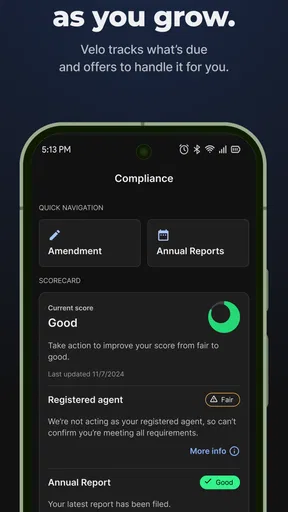
- Useful compliance reminders help avoid missed state filings
- Business banking and bookkeeping tools are available in one place
- Clear package options make startup costs easier to compare
Limitations of ZenBusiness: LLC Formation
- State filing fees are charged separately from ZenBusiness plans
- Several useful features require a paid subscription or add-on
- Processing times can vary depending on the state
- Not ideal for complex companies needing personalized legal advice
- Some services renew automatically unless canceled before the billing date
Similar Picks in This Category
View All
LinkedIn: Community & Network
LinkedIn3.8

Zoom Workplace
zoom.com4.1

Microsoft Teams
Microsoft Corporation4.6

Meta Business Suite
Meta Platforms, Inc.4.6

Webex Meetings
Cisco Systems, Inc.4.5

TeamViewer Remote Control
TeamViewer4.4
Frequently Asked Questions
What is ZenBusiness: LLC Formation, and what does it help with?
ZenBusiness: LLC Formation is a business-formation service designed to help entrepreneurs create and manage an LLC. It can guide you through choosing a business name, preparing formation documents, filing with the state, and handling basic compliance tasks. The app and related services are intended to simplify administrative work, although requirements, processing times, and available features can vary by state and subscription plan.
Can I form an LLC entirely through the ZenBusiness app?
ZenBusiness provides a convenient digital process for starting an LLC, but the exact experience may not be limited to the mobile app alone. You may need to provide personal and business information, review documents, complete identity or payment verification, and access web-based tools or email instructions. ZenBusiness generally submits the required paperwork on your behalf, while final approval depends on the state where you register.
How much does ZenBusiness: LLC Formation cost?
The total cost depends on the formation package you select, your state’s filing fee, and any optional services you add. State fees are typically separate from ZenBusiness service charges. Additional products may include registered-agent services, compliance assistance, business documents, or expedited filing. Before confirming an order, carefully review the renewal terms, recurring charges, taxes, and cancellation policy so the final price is clear.
Does ZenBusiness provide a registered agent and ongoing compliance support?
ZenBusiness may offer registered-agent service and compliance-related tools, depending on the package and state. A registered agent receives official legal and government correspondence for your company, while compliance services can help with reminders or annual filings. These features may involve separate fees or automatic renewals. You should confirm what is included in your selected plan and verify that the service meets your state’s requirements.
Is ZenBusiness suitable for every new business owner?
ZenBusiness can be useful for first-time founders who want guided assistance instead of completing LLC paperwork independently. However, it is not a substitute for legal, tax, or financial advice, particularly for businesses with multiple owners, investors, employees, complex contracts, or unusual tax situations. Before downloading or purchasing, compare the available plans with your needs and consider consulting a qualified professional when important decisions are involved.
